Few things ruin a good gaming session faster than an unexpected error. You launch ARC Raiders, ready for action. Then boom. An error message appears. The game freezes. Or worse, it kicks you back to desktop. Frustrating? Absolutely. Fixable? Most of the time, yes.
TLDR: ARC Raiders unexpected errors usually come from outdated drivers, corrupted files, server issues, outdated game versions, background software conflicts, or unstable internet. Most fixes are simple and take just a few minutes. Verify files, update drivers, restart systems, and check your connection first. These quick steps solve the issue for most players.
Let’s break it down in a simple way. Below are 6 common causes and the fast fixes that get you back into the fight.
1. Outdated Graphics Drivers
Your graphics card does the heavy lifting in ARC Raiders. If its drivers are outdated, things can break. Errors pop up. The game may crash during launch. Sometimes you see strange visual glitches before it shuts down.
Signs this is your problem:
- Game crashes during startup
- Black screen after logo
- Weird textures or flickering
- Error mentions GPU or rendering
Fast Fix:
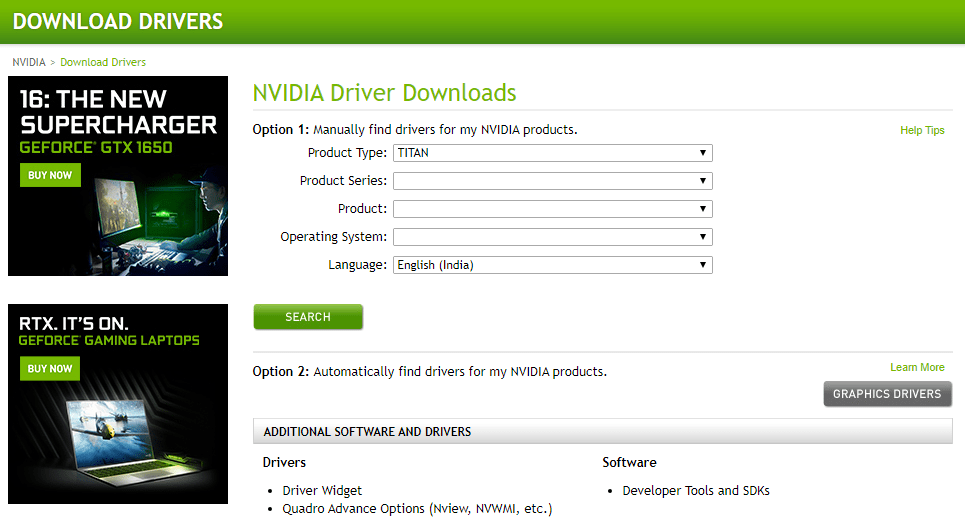
- Open NVIDIA GeForce Experience, AMD Adrenalin, or Intel Arc software.
- Check for driver updates.
- Download and install the latest version.
- Restart your PC.
That’s it. Simple. Driver updates fix a huge number of unexpected errors.
If issues continue, try a clean install of the drivers instead of a basic update. This wipes old files that sometimes cause conflicts.
2. Corrupted Game Files
Sometimes game files break. It happens after interrupted downloads. Or power loss. Or random update hiccups. Even one damaged file can trigger an unexpected error.
Typical symptoms:
- Error appears right after clicking Play
- Game crashes when loading into a match
- Specific error code repeats every time
Fast Fix: Verify Game Files
If you’re using Steam:
- Open Steam Library.
- Right-click ARC Raiders.
- Select Properties.
- Click Installed Files.
- Select Verify integrity of game files.
Steam will scan the game. If files are damaged, it replaces them automatically.
This takes around 5–10 minutes. Then try launching the game again.
Many players find this solves the issue immediately. It’s one of the fastest fixes available.
3. ARC Raiders Server Issues
Sometimes it’s not you. It’s them.
Online games rely on servers. If ARC Raiders servers are down or overloaded, you might see unexpected errors during login or matchmaking.
Clues that point to server problems:
- Error appears during login
- Matchmaking fails repeatedly
- Friends can’t connect either
- Social media is full of complaints
Fast Fix:
- Check official ARC Raiders social channels.
- Look at community forums.
- Visit server status tracking sites.
If servers are down, the only solution is patience. Grab a snack. Stretch. Come back later.
Most outages get resolved within hours.
4. Outdated Game Version
ARC Raiders receives updates. Patches fix bugs. They improve performance. They remove known errors.
If your game didn’t update properly, you might hit compatibility issues. Especially in online modes.
Warning signs:
- Version mismatch error
- Unable to join friends
- Error appeared right after patch day
Fast Fix:
- Restart your launcher completely.
- Check for updates manually.
- Allow the patch to download fully.
- Restart PC once update finishes.
Also make sure automatic updates are enabled in your launcher settings. This prevents future surprises.
Small detail. Big difference.
5. Background Software Conflicts
Some background programs don’t play nice with games. Overlays. Recording software. Antivirus tools. Even RGB managers sometimes cause conflicts.
Symptoms:
- Game crashes randomly mid-match
- Error appears without clear reason
- Only happens when streaming or recording
Common culprits include:
- Discord overlay
- GeForce overlay
- MSI Afterburner
- Third-party antivirus
- Screen recorders
Fast Fix:
- Close unnecessary background apps.
- Disable overlays temporarily.
- Add ARC Raiders to antivirus exceptions.
- Restart your PC and test again.
If the game runs smoothly afterward, re-enable apps one by one. This helps you find the exact troublemaker.
Think of it like detective work. Simple but effective.
6. Unstable Internet Connection
ARC Raiders depends heavily on a stable connection. If your internet drops for even a second, you may see unexpected errors.
Symptoms:
- Disconnects during matches
- High ping spikes
- Rubberbanding before crash
- Login failures
Fast Fix Checklist:
- Restart your router.
- Use wired Ethernet instead of WiFi.
- Close downloads on other devices.
- Run a speed and stability test.
If your ping is unstable, contact your ISP. Packet loss can also cause repeated errors.
Quick tip: Place your router in an open space. Walls and metal objects weaken WiFi signals more than you think.
Bonus Quick Fixes That Often Work
If none of the main causes solved it, try these rapid solutions:
- Restart your PC. Yes, the classic fix still works.
- Run the game as Administrator.
- Disable full-screen optimizations.
- Update Windows.
- Reinstall the game. Last resort, but effective.
Reinstalling takes longer. But it completely refreshes the installation. If hidden files were causing issues, this usually wipes them out.
How to Prevent Future Unexpected Errors
Fixing errors is good. Preventing them is better.
Here are simple habits that help:
- Keep graphics drivers updated monthly.
- Enable auto-updates for games.
- Restart your PC regularly.
- Avoid installing too many performance tweaks.
- Use stable internet for online play.
Also avoid downloading unofficial mods or tools unless verified. Experimental files can break compatibility after patches.
Consistency keeps your system clean. And clean systems crash less.
When to Contact Support
If you’ve tried everything and the error remains, it might be account-specific or deeper than average.
Contact support if:
- You receive the same rare error code repeatedly.
- The game worked before but stopped after a major update.
- The error mentions account authentication.
- Nothing works even after reinstalling.
When contacting support, include:
- Your system specs
- The full error message
- Screenshots
- Steps you already tried
This speeds up the process. Support teams help faster when they have details.
Final Thoughts
Unexpected errors in ARC Raiders feel dramatic. But most are simple behind the scenes. A broken file. An outdated driver. A busy server.
The good news? You now know the six most common causes. And you know how to fix them fast.
Start with the basics. Update. Verify. Restart. Test your connection.
Most players get back into the game within minutes using these steps.
So next time an error pops up, don’t panic. Take a breath. Run through the checklist. Then jump back into the action where you belong.
Game on.