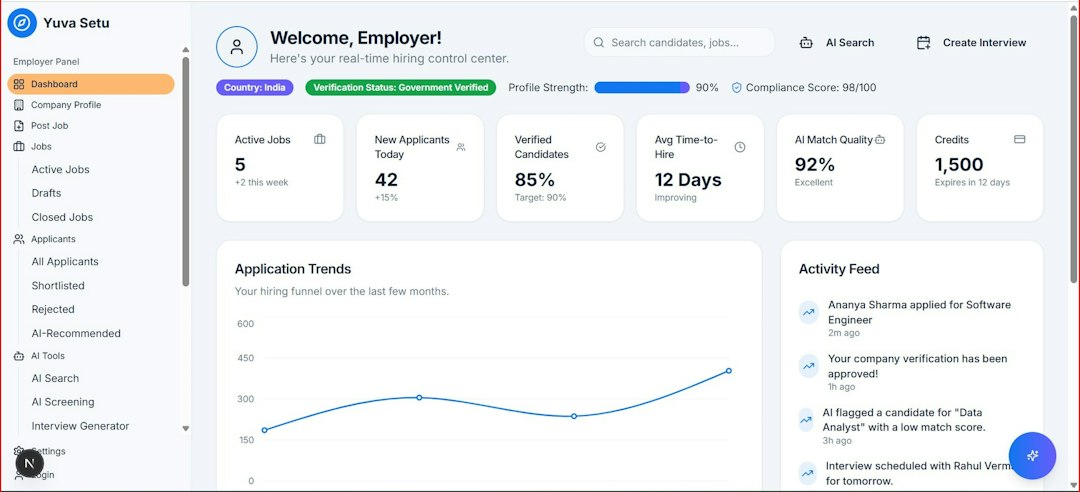
A content marketing platform is most useful when it centralizes planning, production, publishing, analytics, and approvals in one place. Teams that publish across blogs, email, social media, video, and paid channels often lose hours to scattered briefs, spreadsheets, file folders, and status meetings. The right platform cuts that mess down and gives managers a clear view of what is planned, what is late, and what is working.
TLDR: A content marketing platform helps teams manage campaigns from idea to report without juggling five separate tools. For example, a B2B software team publishing 24 assets per month could reduce approval delays by 30% after moving briefs, drafts, deadlines, and analytics into one shared system. The best option depends on team size, channel mix, reporting needs, and budget. Smaller teams may only need a calendar and workflow tool, while enterprise teams often need governance, permissions, integrations, and advanced performance tracking.
What Is a Content Marketing Platform?
A content marketing platform is software used to plan, create, approve, distribute, and measure content campaigns. It acts as a single workspace for marketers, writers, designers, editors, SEO specialists, social teams, and managers.
Instead of asking, “Where is the latest draft?” or “Who approved this?”, teams can check one system. That alone can save a surprising amount of time. It drives teams crazy when a campaign is delayed because a final PDF is buried in someone’s inbox.
These platforms often support blog articles, white papers, email campaigns, landing pages, webinars, social posts, case studies, sales content, and video projects. Some focus on editorial planning. Others include full campaign management and analytics.

Core Features to Expect
Most content marketing platforms offer a mix of planning, workflow, publishing, and reporting tools. The best ones make these features easy to use, not buried behind ten clicks.
- Editorial calendar: Shows planned content by date, owner, status, topic, channel, and campaign.
- Workflow management: Moves content through stages such as brief, draft, edit, design, legal review, approval, and publish.
- Content briefs: Stores goals, keywords, audience details, messaging, sources, and format requirements.
- Collaboration tools: Allows comments, mentions, version history, task assignments, and file sharing.
- Asset management: Organizes images, PDFs, videos, brand files, and final deliverables.
- SEO support: Helps with keyword targeting, on-page recommendations, metadata, and content gaps.
- Publishing integrations: Connects with CMS, email tools, social tools, analytics platforms, and CRM systems.
- Performance analytics: Tracks traffic, engagement, conversions, leads, rankings, and campaign ROI.
- Permissions and approvals: Controls who can edit, approve, publish, or view certain materials.
The catch is that some platforms promise everything but make simple editing feel slow. If assigning a task takes 20 seconds longer than it should, that friction adds up across hundreds of assets.
Main Benefits for Content Teams
Better visibility is usually the first major gain. Managers can see campaign status without chasing people. Writers know what is due. Designers see what is coming next. Executives can review progress without interrupting the whole team.
Faster production comes next. A strong workflow removes guesswork. Each person knows when to act and what to deliver. Templates also reduce repeated setup work for briefs, checklists, outlines, and reports.
Stronger brand control matters as volume grows. Approved messaging, style rules, logos, disclaimers, and product descriptions can stay in one place. This reduces off-brand content and outdated claims.
Improved measurement is another major benefit. Teams can connect content to business goals, such as leads, demos, signups, pipeline, or revenue. Instead of saying a blog post “performed well,” they can show that it generated 1,800 visits, 82 form fills, and 14 sales-qualified leads.
Popular Types of Content Marketing Platforms
There is no single best platform for every company. Options usually fall into several groups.
1. Editorial Calendar and Workflow Tools
These tools are best for small and mid-sized teams that need order without heavy complexity. They help plan topics, assign work, track deadlines, and manage approvals. They may not include deep analytics, but they often integrate with other tools.
Best for: blogs, newsletters, social calendars, lean marketing teams, agencies with repeatable production flows.
2. Enterprise Content Operations Platforms
Enterprise platforms support complex teams, multiple brands, legal reviews, regional approvals, and large content libraries. They often include detailed permissions, campaign hierarchies, compliance controls, and advanced reporting.
Best for: large companies, regulated industries, global teams, and brands with many contributors.
3. SEO Content Platforms
These platforms focus on organic search performance. They help teams research keywords, compare competitors, optimize pages, audit existing content, and track rankings.
Best for: content teams focused on search traffic, topic clusters, blog growth, and content refresh projects.
4. Social Content Management Platforms
Social-first platforms assist with scheduling, community management, approvals, campaign tagging, and performance tracking across networks. Some include listening tools and influencer campaign features.
Best for: social teams, ecommerce brands, media teams, and companies with frequent campaign launches.
5. All-in-One Marketing Suites
These suites combine content planning with email, CRM, automation, landing pages, ads, and analytics. They can be powerful, but they may also feel bulky if the team only needs content operations.
Best for: teams that want content tied closely to lead nurturing, sales activity, and customer data.
How Teams Should Choose a Platform
A team should start with its bottlenecks, not a feature checklist. If approvals are slow, workflow tools matter most. If content is hard to find, asset management is key. If executives doubt results, analytics should be the priority.
Useful questions include:
- How many people create and approve content?
- Which channels need support? Blog, email, social, video, paid, sales, or all of them?
- Does the platform connect with the current CMS, CRM, analytics, and design tools?
- Can nontechnical users manage daily work without constant support?
- Does reporting connect content to leads, revenue, or customer actions?
- Will the pricing still make sense as the team adds users and campaigns?
Honestly, it feels like some vendors make pricing harder to understand than the software itself. Teams should ask about user limits, storage, integrations, onboarding fees, analytics tiers, and support levels before signing.

Implementation Tips
Rolling out a new platform works best in stages. A team can begin with one campaign type, such as blog content or email campaigns. After the workflow is stable, it can add social posts, videos, gated assets, and sales content.
Templates help adoption. A standard brief, approval checklist, naming system, and campaign taxonomy can prevent chaos from moving into the new platform. Without rules, the team simply creates a cleaner version of the same old mess.
Training should be short and role-based. Writers need briefs and comments. Managers need reports and workload views. Executives need dashboards. Not every user needs every feature on day one.
Common Mistakes to Avoid
- Buying too much software: A small team may not need enterprise controls.
- Ignoring adoption: If the tool feels painful, people will return to spreadsheets.
- Skipping integrations: Manual data transfer weakens reporting and wastes time.
- Tracking vanity metrics only: Views and likes matter less than qualified actions.
- Failing to clean old content: A platform cannot fix a cluttered content library by itself.
FAQ
What is the main purpose of a content marketing platform?
Its main purpose is to organize content campaigns from planning to performance reporting. It helps teams manage deadlines, tasks, approvals, assets, publishing, and analytics in one place.
Is a content marketing platform the same as a CMS?
No. A CMS publishes and manages website content. A content marketing platform manages the broader process around strategy, planning, collaboration, approvals, and results. Some platforms connect directly to a CMS.
What type of team needs one?
Any team producing content across several channels can benefit. It is especially useful for companies with many contributors, frequent campaigns, strict approvals, or pressure to prove ROI.
How much does a content marketing platform cost?
Costs vary widely. Simple planning tools may cost a modest monthly fee. Enterprise platforms can require annual contracts, onboarding fees, and custom pricing based on users, features, and integrations.
What features matter most for beginners?
Beginners should prioritize an editorial calendar, task assignments, approval workflows, templates, and basic reporting. Advanced automation can come later.
How can a company measure success after adoption?
It can track faster production cycles, fewer missed deadlines, shorter approval times, better content reuse, higher organic traffic, more leads, and clearer campaign ROI.